Right User, Wrong Country
B2B Guest Blocked by Country? Check Global Secure Access Source IP Restoration
 Samuel Eng
I recently came across a case where a B2B guest user in Sweden was trying to sign in to a resource tenant that blocked access from outside the Nordic countries. The user should have passed that location check, but Entra identified the sign-in as coming from Germany and blocked access.
The country restriction was enforced through Conditional Access. The guest user’s home tenant was using Microsoft Global Secure Access (GSA). Entra was seeing the GSA egress IP, which it geolocated to Germany, instead of the user’s original public IP. Conditional Access was working as configured, but it was evaluating the GSA egress location.
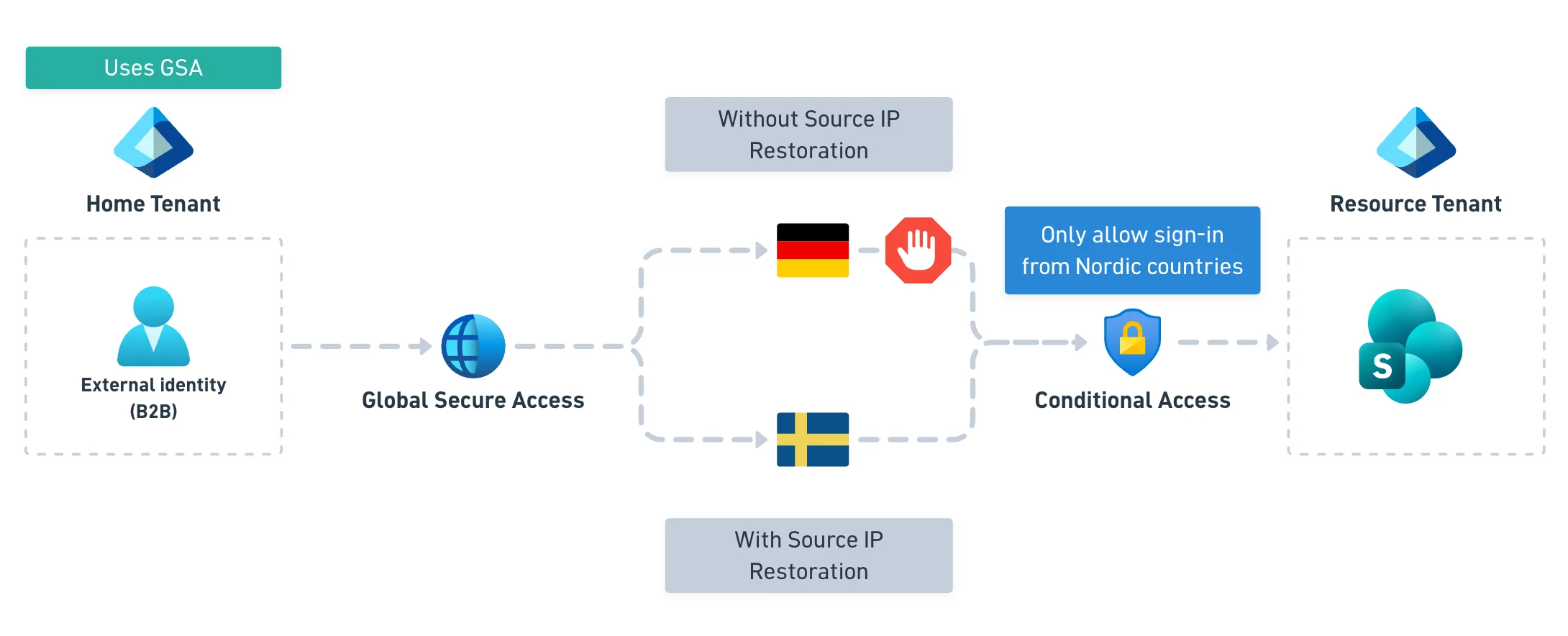
After some good advice from Chris Brumm, source IP restoration was enabled in the guest user’s home tenant. This passed the user’s original public egress IP to Entra. A follow-up sign-in test confirmed that access was no longer blocked by the country restriction.
Microsoft now enables source IP restoration by default for new tenants. If you enabled GSA features before June 2025, you might still need to turn it on manually. I suspect that explains what happened here.

Source IP restoration is available with Microsoft Entra ID P1, but the Microsoft traffic profile also needs to be enabled in GSA.
You can find the setting under Global Secure Access → Settings → Session management → Adaptive Access, where it is labelled Enable Conditional Access Signaling for Microsoft Entra ID.
Restoring the original public IP lets IP-based Conditional Access policies use that address instead of the GSA egress IP. It also helps Entra ID Protection assess sign-in risk more accurately. The original IP is recorded in Entra sign-in and audit logs too, which is useful when investigating suspicious activity.
If a guest user’s sign-in shows up in an unexpected country, ask whether their organization uses GSA. Check source IP restoration before changing the Conditional Access policy.
https://learn.microsoft.com/en-us/entra/global-secure-access/how-to-source-ip-restoration